WENS Haelo Pro is a premium WordPress theme from WEN Solutions that unlocks access to Pro Templates for all WENS themes. With just one activation, you can import beautifully designed demo sites, customize them, and launch a professional-looking website quickly — without needing to buy each theme’s Pro version separately.
Note: Free versions of WENS themes are also available from WEN Solutions if you’d like to try them before upgrading.
Benefits of Using WENS Haelo Pro
WENS Haelo Pro simplifies website creation by providing access to premium templates and additional design features.
- Unlock Pro Templates with One Activation: Activate WENS Haelo Pro once to unlock premium demo templates for all supported WENS themes.
- Save Hours of Design Work: Import complete demo websites with professionally designed pages, layouts, menus, and styling in just a few clicks.
- Easy Customization: Personalize every aspect of your website using the WordPress Site Editor. Change colors, typography, layouts, spacing, and content without writing code.
- Consistent Professional Design: Every Pro template is carefully designed to match the style and purpose of its respective theme, ensuring a polished and cohesive website.
- Cost-Effective: Instead of purchasing multiple Pro themes separately, one WENS Haelo Pro license provides access to a growing collection of premium templates.
Themes Included with WENS Haelo Pro
Activating WENS Haelo Pro unlocks professionally designed demo templates for a wide range of WENS themes.
- WENS Haelo Pro – View Demo
- WENS Vivid Pro – View Demo
- WENS Agrovibe Pro – View Demo
- WENS Food Palette Pro – View Demo
- WENS Styllusion Pro – View Demo
- WENS Travel Expanse Pro – View Demo
- WENS Furnitecture Pro – View Demo
- WENS Nextgenblog Pro – View Demo
- WENS Healthy Plates Pro – View Demo
- WENS Vibes Pro – View Demo
- WENS Inspire Pro – View Demo
- WENS Explore Ease Pro – View Demo
- WENS Musico – View Demo
- WENS Thought Pro – View Demo
- WENS Portfolio Pro – View Demo
- WENS Explore Ease Lite Pro – View Demo
- WENS Trails Pro – View Demo
- WENS Travel Pro – View Demo
- WENS Corporate Pro – View Demo
- WENS Wander Pro – View Demo
- WENS Architecture Pro – View Demo
- WENS Honey Pro – View Demo
- WENS Digital Agency Pro – View Demo
- WENS TravelGo Pro – View Demo
- WENS BeatBuds Pro – View Demo
- WENS Academy Pro – View Demo
- WENS Coffee Pro – View Demo
- WENS Track Pro – View Demo
- WENS Blogify Pro – View Demo
- WENS Creative Pro – View Demo
- WENS Travel Next Pro – View Demo
- WENS Barber Pro – View Demo
- WENS FitZone Pro – View Demo
- WENS Creative Studios Pro – View Demo
- WENS Adventure Pro – View Demo
- WENS Folio Pro – View Demo
- WENS Consult Pro – View Demo
- WENS Travel Studio Pro– View Demo
- WENS TravelX Pro– View Demo
- WENS Travel Joy Pro– View Demo
- WENS XBlog Pro– View Demo
After selecting a theme, simply click Import Demo to install its pages, templates, menus, sample content, and styling automatically.
Built-in Gutenberg Blocks
WENS Haelo Pro includes a collection of custom Gutenberg blocks that help you create attractive and engaging websites without relying on multiple third-party plugins.
| Block | Purpose |
|---|---|
| Accordion | Display FAQs and collapsible content sections. |
| Advanced Gallery | Create responsive image galleries with lightbox support. |
| Back To Top | Add a button for quick page navigation. |
| Breadcrumb | Improve site navigation and user experience. |
| Video Popup | Display videos inside a popup window. |
| Counter | Showcase statistics and achievements with animated counters. |
| Date | Display dynamic or custom dates. |
| Icon Picker | Easily insert icons into your content. |
| Map | Embed interactive location maps. |
| Modal | Show announcements, forms, or promotional popups. |
| Progress Bar | Display progress visually. |
| Read Time | Estimate reading time for blog posts. |
| Separator | Organize content with stylish dividers. |
| Slider | Showcase featured content with image sliders. |
| Social Share | Enable social sharing buttons. |
| Rating Star | Display product or content ratings. |
| Text Marquee | Show scrolling announcements or news. |
| Loader | Display loading animations. |
| Category List | Display blog categories. |
| WENS Haelo Author | Show author profile information. |
| Comment Count | Display total comments on posts. |
| Post Like | Allow visitors to like posts. |
| Chart | Visualize data using charts and graphs. |
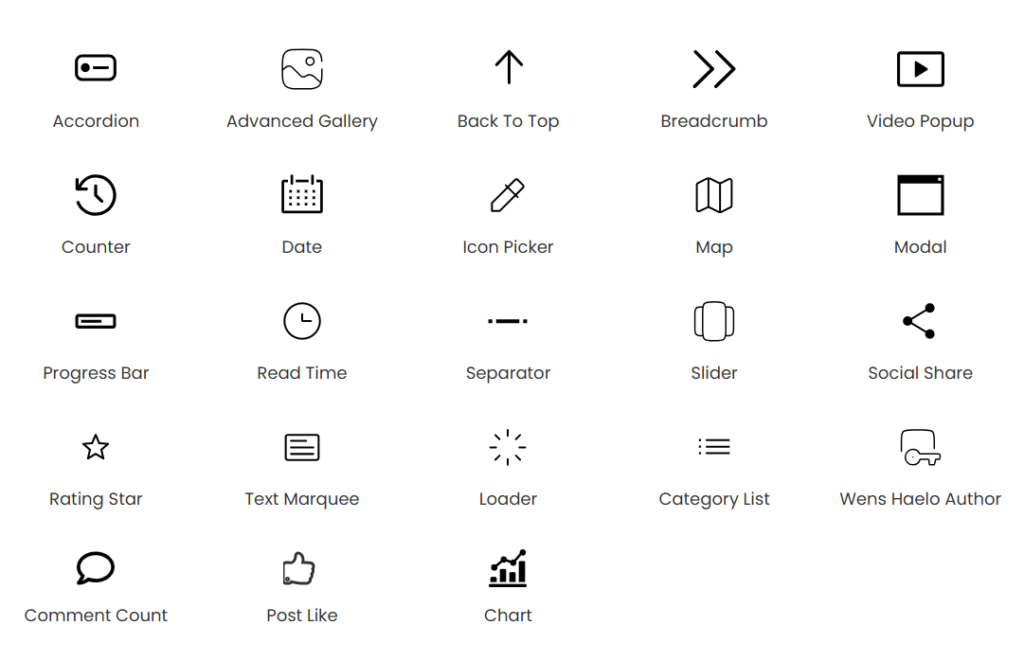
These built-in blocks reduce plugin dependency while providing powerful design functionality directly inside the WordPress editor.
How to Unlock Pro Templates
Install WENS Haelo Pro
- Option A: Install via Dashboard
- Purchase a theme from wensolutions.com
- Download the WENS Haelo Pro theme zip.
- Go to WordPress Dashboard > Appearance > Themes > Add New > Upload Theme.
- Upload wens-haelo-pro.zip and click Install Now.
- Option B: Install via FTP
- Download and unzip wens-haelo-pro.zip.
- Using an FTP client, upload the folder to: /wp-content/themes/
- Log in to your WordPress Dashboard.
- Go to Appearance > Themes and activate WENS Haelo Pro.
Activate WENS Haelo Pro
After successfully installing the required theme, you need to activate your theme. Follow the given steps to activate the WENS Haelo Pro theme.
- Go to Appearance > Themes.
- Locate WENS Haelo Pro and click Activate.
- Then, go to Appearance > Theme Options.
- Enter your license key in the License Key field.
- Click Activate.
Import Demo Content
Importing a demo installs ready-made pages, layouts, menus, widgets, styles, and sample content so you can start customizing immediately.
- Go to Appearance → Explore Demo.
- Browse the available Pro templates.
- Select your preferred theme demo.
- Click Import.
- Wait until the import completes.
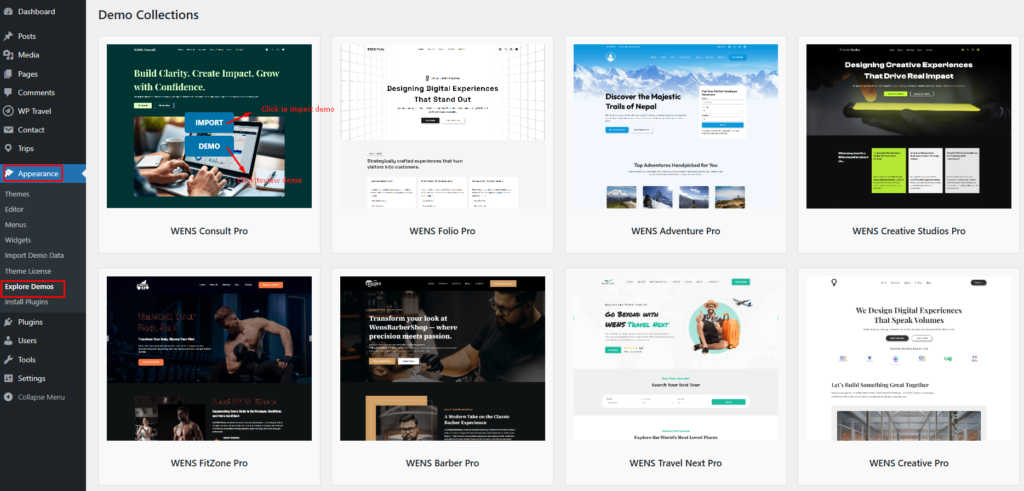
After the process finishes, your website will closely match the selected demo and will be ready for customization.
Tip: Demo images may be replaced with placeholders due to licensing restrictions. You can easily upload your own images after the import.
Why Choose WENS Haelo Pro?
With WENS Haelo Pro, you save time, money, and effort by unlocking all WENS Pro templates with a single purchase. You also get access to powerful Gutenberg blocks, ensuring that your website not only looks great but also performs seamlessly.
Whether you’re building a business site, blog, eCommerce store, portfolio, or travel platform, WENS Haelo Pro helps you create a stunning, functional website faster and with less effort.