WENS Magazine Pro gives you access to professionally designed Pro Templates that help you quickly build modern magazine, news, blog, and publishing websites.
To unlock these templates, you need to install and activate WENS Magazine Pro and import the available starter demos from the WordPress dashboard.
Note: A free version of the WENS Magazine theme is also available from WEN Solutions if you would like to try it before upgrading to the Pro version.
Benefits of Using WENS Magazine Pro
WENS Magazine Pro helps you build professional magazine and news websites with powerful design tools and ready-made layouts.
- Ready-Made Magazine Templates: Start your website with professionally designed templates created for different publishing niches, including general magazines, sports, fashion, and recipe websites.
- One-Click Demo Import: Import complete starter websites with pre-built layouts, pages, templates, and styling to speed up your website setup.
- Full Site Editing Support: Customize your website using the WordPress Site Editor. Edit headers, footers, templates, colors, typography, and layouts without writing code.
- Flexible Magazine Layouts: Create engaging content layouts using featured posts, sliders, breaking news sections, post showcases, and category-based designs.
- No Coding Required: Build and customize a professional magazine website using WordPress blocks and visual editing tools.
Available Pro Templates
WENS Magazine Pro includes multiple professionally designed starter demos for different magazine and publishing websites.
Available demos include:
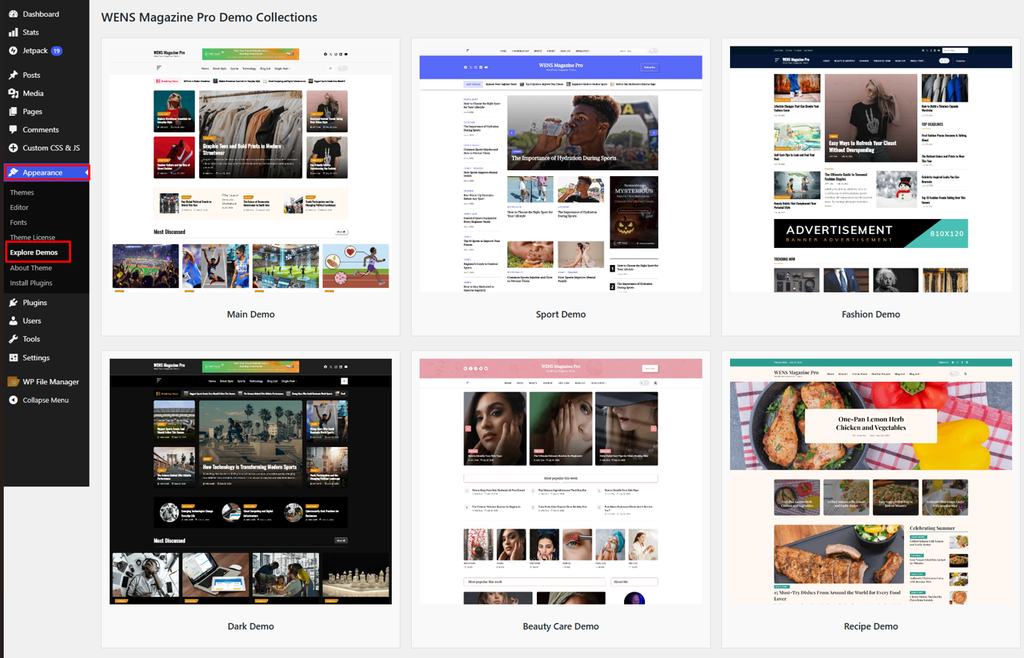
- WENS Magazine Pro – View Demo
- WENS Magazine Pro Sports – View Demo
- WENS Magazine Pro Dark – View Demo
- WENS Magazine Pro Fashion – View Demo
- WENS Magazine Pro Beauty Care – View Demo
- WENS Magazine Pro Recipe – View Demo
Each template provides a complete website structure that can be imported and customized according to your needs.
Built-in Gutenberg Blocks
WENS Magazine Pro includes custom Gutenberg blocks and design elements to help create dynamic magazine layouts.
| Block / Feature | Purpose |
|---|---|
| Back To Top | Improve user navigation |
| Breadcrumb | Improve website navigation |
| Today’s Date | Display current date information |
| Multi Post Slider | Display multiple posts in different layouts |
| Post Slider | Showcase featured articles with attractive sliders |
| Post Showcase | Highlight selected stories and featured content |
| Post Tab Showcase | Organize posts using tabbed layouts |
| Breaking News | Display latest headlines and important updates |
| Search Block | Add search functionality |
| Sidebar Popup | Displays promotional content, announcements, and subscription forms in a sidebar popup. |
How to Unlock Pro Templates
Install WENS Magazine Pro
- Option A: Install via WordPress Dashboard
- Purchase WENS Magazine Pro from WEN Solutions.
- Download the theme ZIP file.
- Log in to your WordPress Dashboard.
- Go to:Appearance → Themes → Add New → Upload Theme
- Upload the
wens-magazine-pro.zipfile. - Click Install Now.
- Activate the theme.
- Option B: Install via FTP
- Download and unzip the WENS Magazine Pro theme file.
- Upload the theme folder to: /wp-content/themes/
- Log in to your WordPress Dashboard.
- Go to Appearance > Themes and activate WENS Magazine Pro.
Activate WENS Magazine Pro
After installation, activate your theme license.
- Go to Appearance > Themes.
- Locate WENS Magazine Pro and click Activate.
- Then, go to Appearance > Theme Options.
- Enter your license key in the License Key field.
- Click Activate.
Import Demo Content
Importing a demo allows you to quickly create a website similar to the selected template.
- Go to Appearance → Explore Demo.
- Browse the available Pro templates.
- Select your preferred theme demo.
- Click Import.
- Wait until the import completes.
The demo import includes:
- Homepage layout
- Pages
- Menus
- Templates
- Theme settings
- Sample content
After importing, you can customize the website using the WordPress Site Editor.
Tip: Demo images may be replaced with placeholder images due to licensing restrictions. You can replace them with your own images after importing.
Note: It is recommended to import demos on a fresh WordPress installation or staging website. Always take a backup before importing demo content on an existing website.
Why Choose WENS Magazine Pro?
WENS Magazine Pro provides everything needed to create a modern publishing website:
- Professionally designed magazine templates
- Flexible block-based customization
- Full Site Editing support
- Advanced magazine layouts
- Responsive design
- SEO-friendly structure
- Easy demo import
Whether you are creating a news portal, online magazine, editorial blog, lifestyle website, or niche publication, WENS Magazine Pro helps you launch a professional website faster and easier.