WENS Musico Pro comes with a collection of professionally crafted starter templates designed for musicians, bands, DJs, music festivals, podcasts, and other entertainment-focused websites. These templates help you launch a polished website in minutes without building everything from scratch.
After installing the Pro theme, you can browse and import any available starter site directly from your WordPress dashboard.
Note: If you’re new to WENS Musico, you can begin with the free version and upgrade to WENS Musico Pro whenever you need additional templates and advanced customization features.
Why Use WENS Musico Pro?
Building a music website doesn’t have to be time-consuming. WENS Musico Pro provides everything you need to create an engaging online presence while giving you complete control over your site’s appearance.
With the Pro version, you can:
- Launch a professionally designed music website in minutes.
- Choose from multiple ready-made starter sites.
- Customize every section using the WordPress Site Editor.
- Display artists, albums, events, playlists, galleries, and blog content with ease.
- Create a responsive website without writing code.
Starter Templates Included
WENS Musico Pro includes several starter websites designed for different types of music and entertainment projects. Some available demos include:
Each template provides a complete website structure that can be imported and customized according to your needs.
Built-in Gutenberg Blocks
WENS Musico Pro includes a variety of built-in sections and customization options to help you create an attractive music website.
| Blocks | Description |
|---|---|
| Accordion | Organize content into collapsible sections for a cleaner user experience. |
| Advanced Gallery | Create beautiful image galleries with flexible layouts. |
| Back To Top | Add a convenient button that lets visitors quickly return to the top of the page. |
| Breadcrumb | Improve navigation by showing visitors their current page location. |
| Counter | Display animated counters for statistics, milestones, or achievements. |
| Icon Picker | Choose from a wide range of icons to enhance your content visually. |
| Map | Embed interactive maps to display venues, offices, or event locations. |
| Music Player | Showcase audio tracks, albums, playlists, or podcasts with a built-in music player. |
| Slider | Create responsive image and content sliders to highlight featured content. |
| Social Share | Enable visitors to share your content across popular social media platforms. |
| Rating Star | Display star ratings for reviews, products, or featured content. |
| Loader | Add stylish loading animations for improved user experience. |
| Timeline | Present events, achievements, or project history in a chronological timeline. |
| Sidebar Slide | Display a sliding sidebar for announcements, promotions, or additional content. |
| Typewriter | Add animated typing effects to headings and promotional text. |
| WENS Search | Provide an enhanced search experience to help visitors quickly find content. |
| Video Popup | Display videos in elegant popup windows without redirecting visitors from the page. |
How to Import Pro Templates
Install WENS Musico Pro
Option 1: Install via WordPress Dashboard
- Purchase and download the WENS Musico Pro ZIP file.
- Log in to your WordPress Dashboard.
- Navigate to Appearance → Themes → Add New → Upload Theme.
- Upload the downloaded ZIP file.
- Click Install Now.
- Activate the theme.
Option 2: Install via FTP
- Extract the downloaded ZIP file.
- Upload the extracted theme folder to:
/wp-content/themes/ - Log in to your WordPress Dashboard.
- Navigate to Appearance → Themes.
- Activate WENS Musico Pro.
Activate Your License
After installing the theme, activate your license to access all premium features and starter templates.
- Navigate to Appearance → Theme Options.
- Open the License section.
- Enter your license key.
- Click Activate License.
Once your license is activated, all available Pro templates will be unlocked.
Import a Starter Template
Importing a starter template installs the layouts and settings used in the demo website.
- Go to Appearance → Explore Demo.
- Browse the available starter templates.
- Select the template you want to import.
- Click Import.
- Wait for the import process to finish.
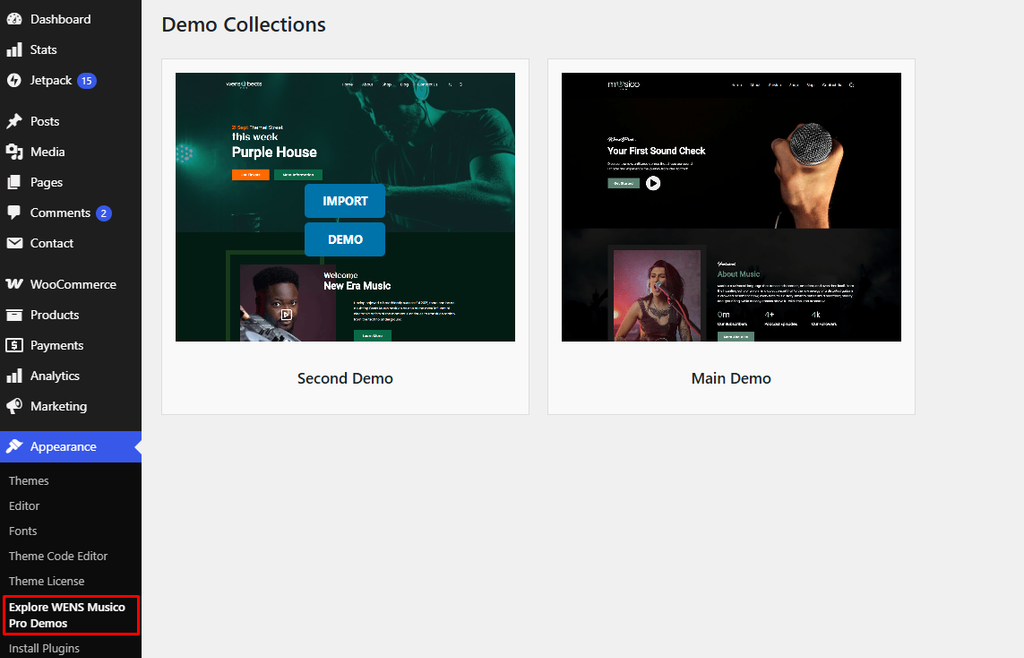
The imported demo typically includes:
- Homepage layout
- Inner pages
- Navigation menus
- Theme templates
- Theme settings
- Sample content
After the import is complete, you can customize every part of your website using the WordPress Site Editor.
Tip: Some demo images may be replaced with placeholder images because of licensing restrictions. Simply upload your own images after importing.
Note: For the best experience, import demos on a fresh WordPress installation or staging site. Always back up your website before importing demo content on an existing site.
Start Building Your Music Website
Whether you’re creating a website for a solo artist, band, DJ, music producer, recording studio, concert organizer, podcast, or festival, WENS Musico Pro provides a professional foundation that helps you get online quickly.
With ready-made templates, custom Gutenberg blocks, Full Site Editing support, and one-click demo imports, you can build a modern, responsive music website and customize every detail to reflect your unique style and brand.